
“Is Showit good for SEO?” I get this question constantly — and the answer is yes. Like, confidently yes. In some ways, it’s even better than other platforms. But here’s the part people don’t love hearing: your SEO results have way more to do with you than your website builder.
Google is not judging your website builder. It is judging your website
Showit gives you everything you actually need — page titles, meta descriptions, clean URLs, alt text, image controls, built-in SSL, and a WordPress blog (which is huge for SEO). That’s the toolbox. But Google isn’t handing out first-page rankings just because you picked the “right” platform. It’s looking at how clearly your site explains what you do, who it’s for, and whether your content matches what people are already searching for.
Most “Showit SEO problems” are really structure problems. Or content problems. Or “we never set up Google Search Console” problems.
This is also why I build our Showit templates with structure first — not just aesthetics. Pretty is the easy part. A website that actually makes sense to Google and your dream client? That’s the real strategy.
In 2026, SEO is still one of the most powerful ways to get warm traffic
Why SEO matters more when social media feels unpredictable
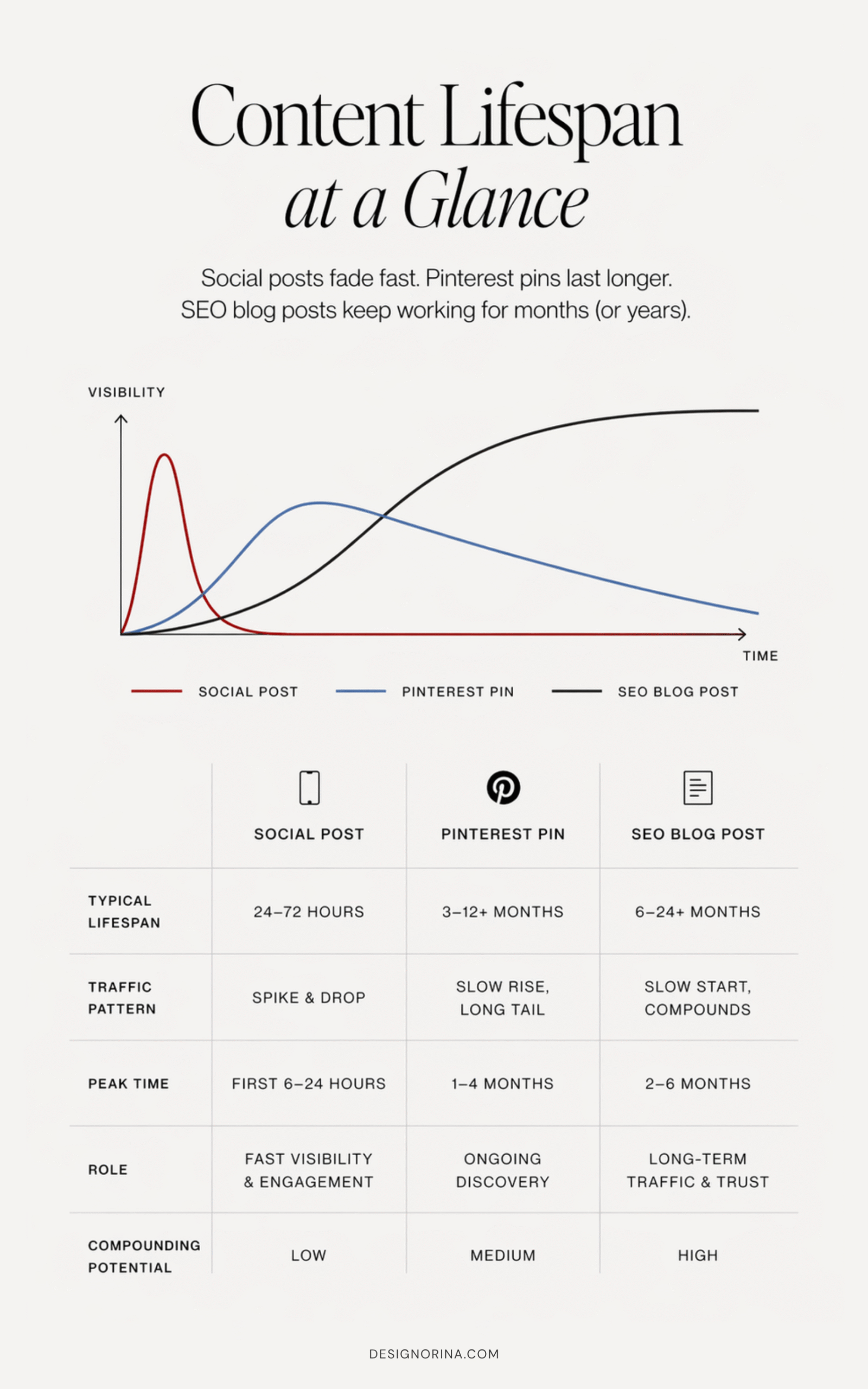
One day your post pops off, the next day it’s crickets and you’re questioning everything — that’s the reality of social media right now. It’s rented attention. Helpful? Yes. Reliable? Not really. SEO is what gives your business something solid to stand on while the algorithm is having mood swings.
SEO traffic compounds instead of disappearing
When someone finds you through Google, they’re usually already looking for what you offer — your services, templates, blog posts, answers. That’s warm traffic. Not “just browsing while waiting in line” energy. And the best part? A good blog post doesn’t vanish in 24 hours. It can bring in clicks, leads, and sales months (even years) later.
It does take time to build — no instant gratification here — but once it starts working, it keeps working.
If you want the full breakdown, read this: SEO Is Not Doomed: What Actually Works for Creative Businesses in 2026
What really makes a Showit website rank
Before you touch a single SEO setting in Showit, zoom out for a second. Because SEO isn’t something you “turn on” — it’s something you build into your site from the ground up. And this is where most people go wrong.
Your page structure tells Google what matters
If your site feels messy, unclear, or all over the place to a human, Google feels the exact same way. It’s not guessing what your site is about — you have to show it, clearly.
Here’s what actually moves the needle the most (QUICK CHECKLIST):
- Clear page structure (Every page has ONLY one H1, and well organized H2s + H3s)
- Search-friendly page titles + meta descriptions
- Clean, simple URLs/slugs
- Optimized images + video (so your site isn’t painfully slow)
- Internal links connecting your pages
- Google Search Console + sitemap setup
- Consistent, helpful blog content through WordPress
- Backlinks (Pinterest, collaborations, features, etc.)
- Making sure there are no silly mistakes like no-index tags (I was indeed a victim of this)
Showit gives you control over all of this — you just have to use it intentionally.
And yes, this is exactly how our Showit templates are built: structure first, then beautiful, editorial design that supports it.
Showit SEO Step 1: Make your website easy for Google and humans to understand
Most websites don’t have a keyword problem — they have a clarity problem. If your site feels vague, cluttered, or hard to follow, no amount of SEO tricks is going to save it. This is the unsexy fix that works fast.
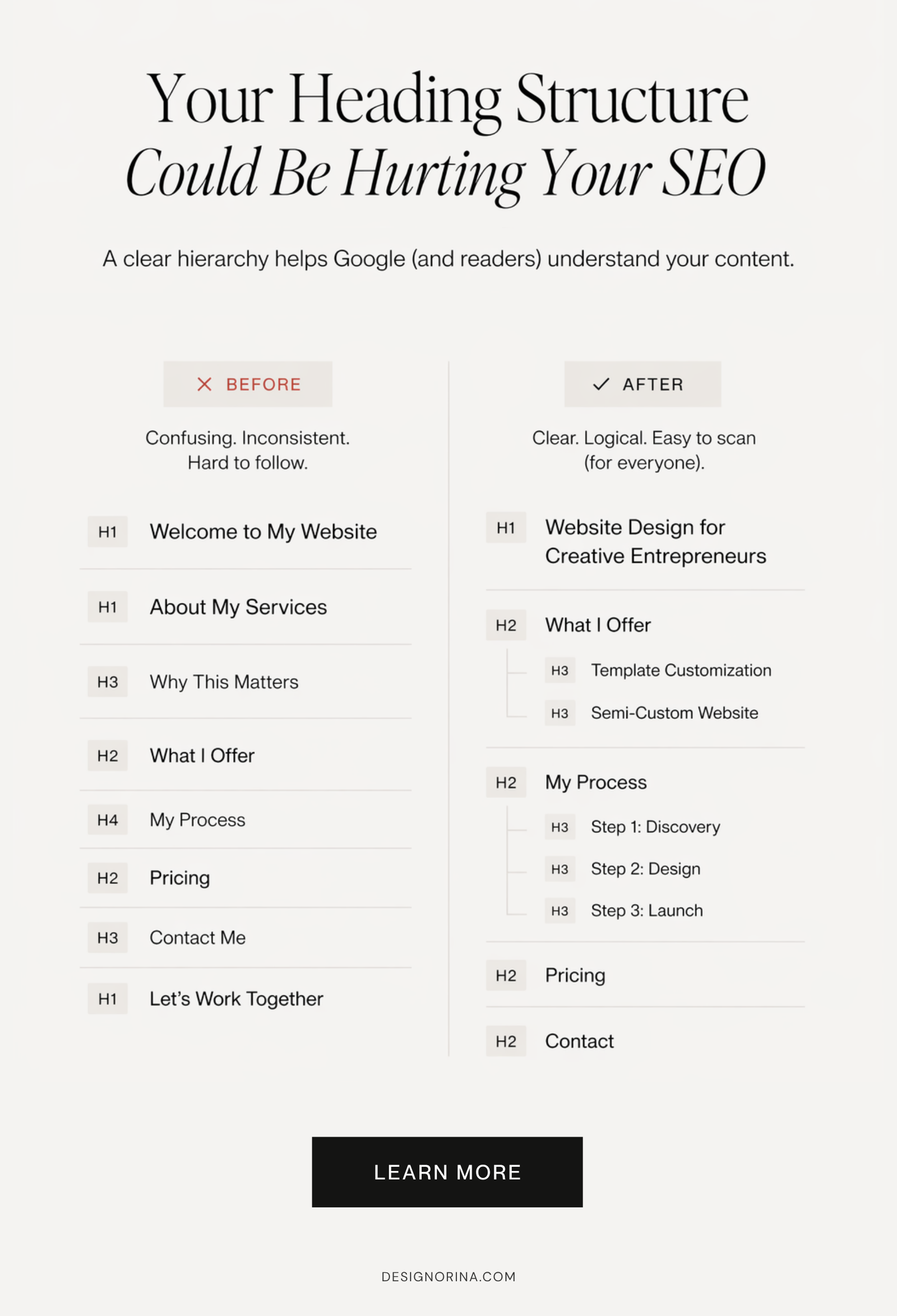
Use one H1 per page
Every page should have one clear job. Your homepage should instantly say what you do, who it’s for, and where to go next (multiple next-step options are still fine, homepage has a navigational role anyways). Your service pages should be specific (not poetic riddles). Your blog posts should answer one main question — not five half-answers crammed together.
Your headings are your structure:
- H1 = the main point of the page (just one)
- H2 = the big sections
- H3 = supporting details under those sections
If you’re using multiple H1s because they “look better,” I love you, but we need to stop.
Then add internal links like you’re guiding someone through your site on purpose — homepage → services, blog posts → offers, posts → related posts, case studies → inquiries.
Do this now:
Our Showit templates are built like this already — so you’re not dragging boxes around wondering what goes where.
Showit SEO Step 2: Fill out the Showit SEO settings people always skip
This is the part where people go “yeah yeah I’ll do it later” — and then never do. Meanwhile, these tiny settings are literally how Google reads and presents your site.
Write page titles for humans and Google
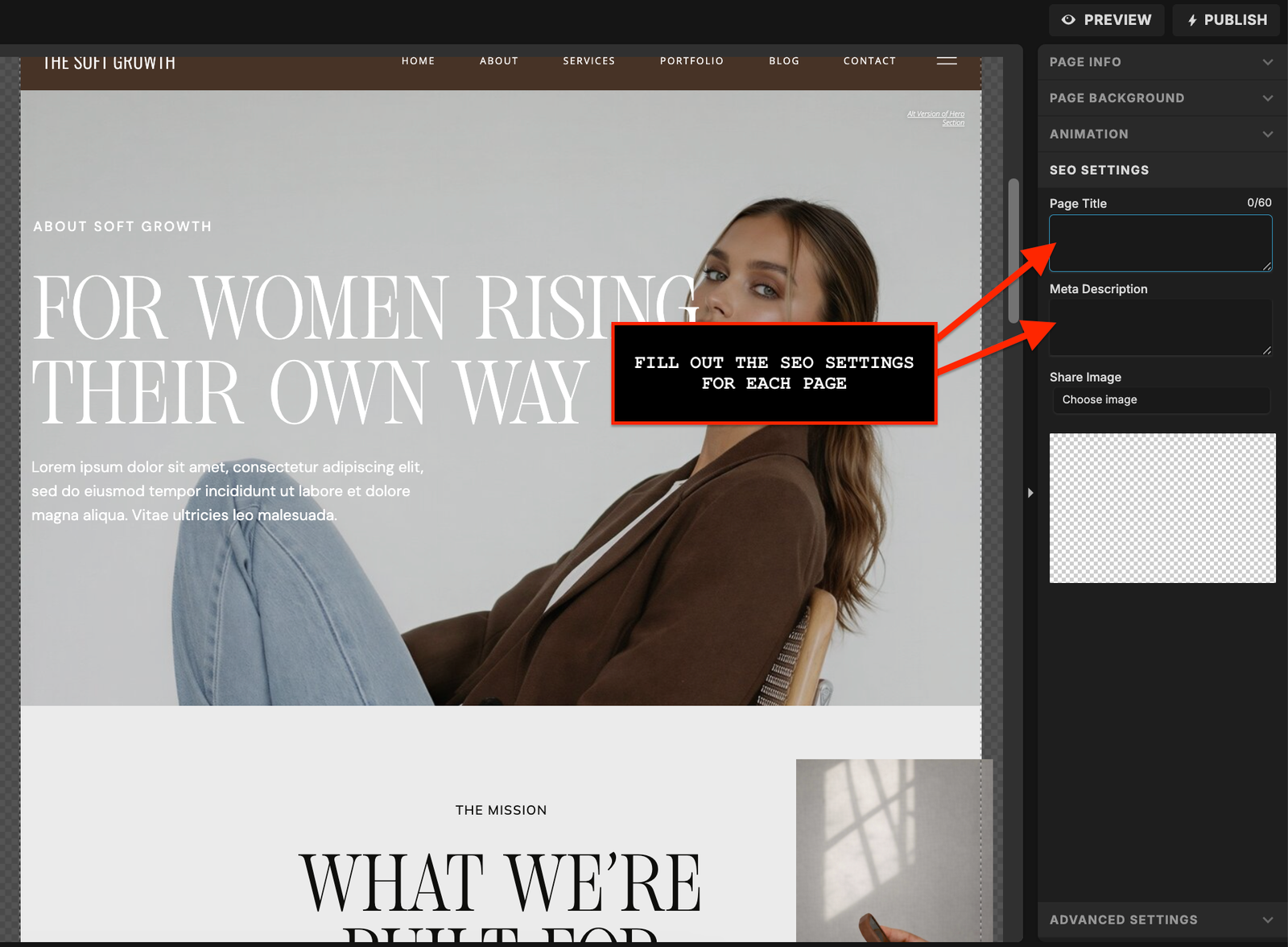
Inside Showit, every page has a few key fields you need to take seriously:
- SEO page title (what shows in Google results)
- Meta description (your little pitch to get the click)
- URL slug (keep it short, clean, and readable)
- Image alt text (describe what’s actually in the image)
- Featured/social images (so your links look legit when shared)
Meta descriptions won’t magically rank you — but they do affect whether someone clicks. And slugs? Please don’t turn them into a 12-word sentence.
Bad: /best-photographer-branding-photography-los-angeles-session
Better: /brand-photography-los-angeles
Also: compress your images and videos before uploading. Slow pages = people leave (and Google hates it, too).
If you need a walkthrough: How to Add SEO Titles, Descriptions, and Alt Text in Showit
Do this now:
Showit SEO Step 3: Google Search Console is not optional if you care about showing up on Google
If you haven’t connected Google Search Console yet… we need to fix that immediately. Because right now, you’re basically guessing what’s happening with your SEO — and hoping for the best.
Set up Google Search Console
Search Console is how Google communicates with you. It shows if your pages are being indexed, what keywords you’re showing up for, how many people are seeing your site, and if something is broken behind the scenes. It can also speed SEO things up a lot.
Start here:
- Verify your site
- Submit your sitemap (so Google can actually find your pages)
- Check that your main pages are indexed
- Look for “noindex” issues (this one hurts bad if missed)
- Scan for errors or broken pages
- See what search terms are already bringing impressions
Full tutorial: How to Connect Google Search Console to Your Showit Website
Showit SEO Step 4: The WordPress blog is one of Showit’s biggest SEO advantages
This is where things start to click. Your main pages (home, services, etc.) go after your core keywords — but your blog? That’s how you show up for everything else people are actively searching.
Write for high-intent questions, not random traffic
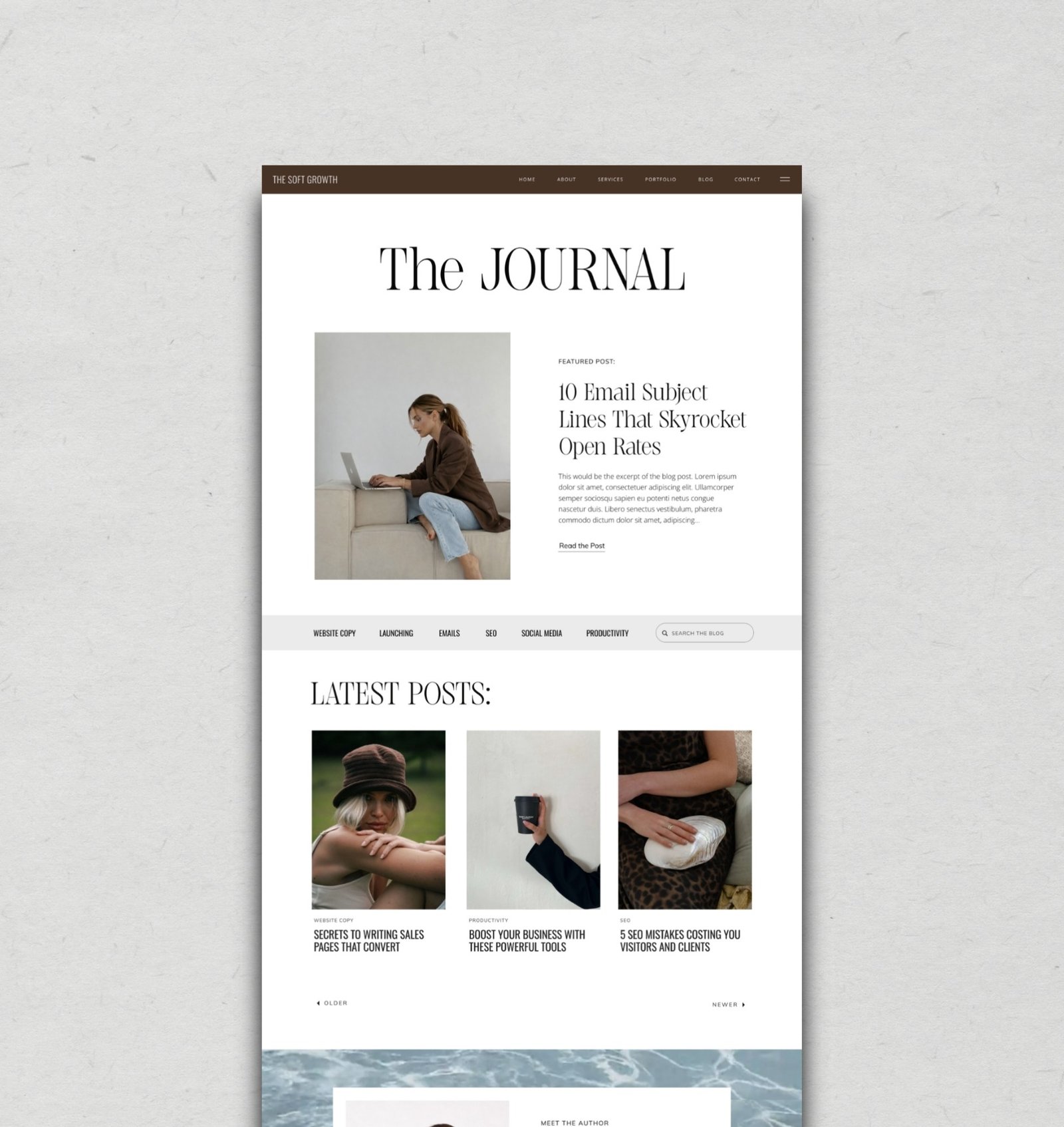
Showit + WordPress is kind of the best of both worlds: you get full design control and serious blogging power. Use it. Because blog posts are how you target specific, high-intent searches like “Showit SEO guide,” “how to prepare for a brand photoshoot,” or “best website template for coaches.”
This is where newer sites can win — long-tail keywords are less competitive and way more specific.
But here’s the rule: don’t publish fluff. If your post isn’t helping someone make a decision, solve a problem, or take a next step, it’s not doing anything for your SEO.
Start with:
- Tutorials
- Case studies
- Pricing guides
- “Best tools” posts
- Mistakes + checklists
And always link your posts to something relevant — your services, your products, your lead magnets.
Showit SEO Step 5: Backlinks, Pinterest, and collaborations are your off-site SEO trio
You can do everything right on your site and still feel like… okay, where is the traffic? That’s because SEO doesn’t stop at your website. Google is also looking at what the rest of the internet is saying about you.
Start with easy backlinks you already have access to
Backlinks = other websites linking to yours. And no, you don’t need anything fancy to start. You probably already have opportunities sitting right in front of you:
- Pinterest pins linking to your blog posts or templates
- Your Instagram bio + story links
- Guest posts or podcast features
- Client case studies + portfolio credits
- Collaborations
Pinterest especially pulls double duty — it can drive traffic and support your SEO over time.
If you’re one of our clients, reach out — we love featuring you in our blog posts, case studies, and template showcases when it fits.
One rule: don’t buy weird, spammy backlinks. It’s not worth it.
Want help with Pinterest? Read this: How to Use Pinterest to Drive Traffic to Your Showit Website
Or need someone to manage your Pinterest? Reach out to Marina from themanagegram.com
The SEO mistakes I see constantly after 100+ client projects
After 5+ years and working on 100+ client sites, I can tell you this with love: most SEO issues are not mysterious. They’re the same handful of small (but painful) mistakes happening over and over again.
AI fluff is not an SEO strategy
Here’s what I see all the time:
- Multiple H1 tags used just for design
- Important pages accidentally set to noindex (this one hurts)
- No Google Search Console connected
- Vague or missing page titles + meta descriptions
- Messy, overstuffed URLs
- Broken links or chaotic redirects
- Zero internal linking
- Massive, uncompressed images and videos
- AI-written content that says a lot but means nothing
- Blog posts written without any strategy
- Beautiful sites that never clearly say what they do
- No backlinks or off-site visibility
- Expecting instant results
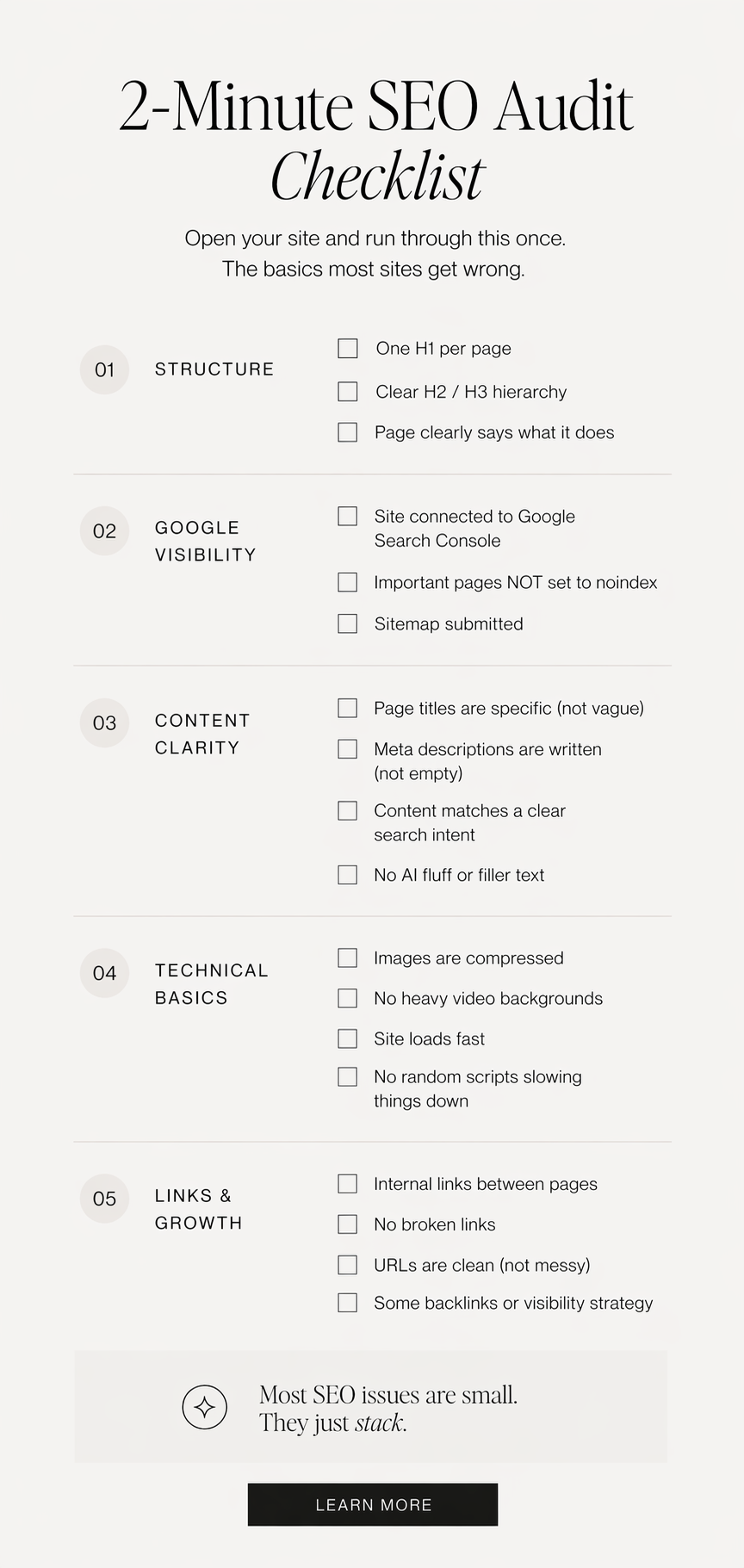
Quick audit:
Open your site and check:
What to expect after 1, 4, and 8 months of SEO
I’m going to be very honest with you because anything else is useless: SEO takes time. If someone promises you page one of Google in 30 days, that’s your cue to run.
Months 2–4: Long-tail keywords can start moving
Here’s the realistic timeline I see across well-built Showit sites:
- 0–1 month: Google figures out you exist. Pages get indexed, you might see a few impressions, but traffic is basically… quiet.
- 2–4 months: You can start hitting page 2–3, or even page 1 for more specific long-tail searches (especially if your content is actually helpful).
- 4–8 months: This is where things get interesting — consistent impressions, clicks, and certain posts or pages landing on page 1.
It’s not guaranteed. Your niche, competition, backlinks, and consistency all matter. Sometimes there’s also a little randomness involved.
But if your structure is solid and your content is intentional, it does start compounding.
Do you need an advanced Showit plan to have good SEO?
Short answer: no. Longer answer: also no, unless you actually have a reason.
Start with the basics before paying for more tools
You do not need an advanced plan to:
- Structure your pages correctly
- Write clear, keyword-aligned content
- Add SEO titles, descriptions, and alt text
- Connect Google Search Console
- Blog consistently
- Build internal links and backlinks
That’s the foundation. And that’s what moves the needle.
Advanced plans can make sense if you’re working with an SEO expert, need specific plugins, running WooCommerce, or have a more complex setup. But tools without strategy? Just another monthly bill.
This is also why our templates are built for business owners who want a strong foundation without needing to become SEO experts.
(Quick note: always double-check current Showit plan features — they can change.)
Showit SEO FAQ
Yes. Showit gives you all the tools you need — your results depend on how you use them.
Also yes. Many do. It depends on your niche, content quality, competition, and consistency.
No. It reads badly, looks messy, and doesn’t help. Use keywords naturally where they make sense.
Yes — it’s one of its biggest advantages. You get design freedom + strong blogging capabilities.
Not always, but it gives you way more opportunities to show up in search. It’s a long-term win.
Not if it’s done right. Issues usually come from broken links, missing redirects, or lost metadata.
No — but some are better than others. Structure and strategy matter more than how “pretty” it is.
That’s exactly why our Showit templates are designed to be both beautiful and strategic.
Not really. Advanced plan can make sense if you’re working with an SEO expert, or need specific plugins. But without strategy it’s just another monthly bill. With time and effort, you can rank on Google with good strategy, good page structure, and valuable content.
First of all, nobody can promise page one of Google, ever. Anyone who guarantees that is not to be trusted. Typically, we see it take 3–6 months to start showing up on second or third page of Google (for longer, niche keywords). And 6–12 months to begin appearing on the first page (but only with strong, valuable content.)
Your Showit site can be pretty, strategic, and searchable
SEO isn’t hacks, tricks, or gaming the system. It’s just… clear communication. A site that’s easy to understand, easy to navigate, fast to load, and actually helpful will always have a better shot at ranking.
Showit gives you everything you need to do this well. The rest comes down to how intentionally you use it — your structure, your content, your links, your consistency over time.
Start with your structure
Clean up your pages. Optimize what already exists. Publish one genuinely helpful blog post. Connect Search Console before you spiral.
And if you want a head start: browse our Showit templates — built to be beautiful, strategic, and actually work.